Category: Feeds

  • Creating a group chat between feed readers using real-time feed subscriptions

    This blog post will walk you through the process of creating a group chat between feed readers, using real-time feed subscriptions and web sockets.

    Introduction

    “I was excited and math was flying behind my head.”

    That was my friend Frankie’s reaction when he used a feed reader with a real-time connection to another feed reader. This article will outline how we created a group chat with feed subscriptions, MetaWebLog API and WebSockets.

    To make a group chat with feeds, we will make one of the feed reader/publisher apps the “host” (feed publisher) of the group chat messages and each of the other group chat participants will be a “client” (feed consumer).

    Feed items with < group >

    The host’s feed includes the most recent messages from all users in the chat, each message looks like this in the XML feed:

    Message item element in a RSS feed

    We need some group information added to these messages, we can use a namespace to define new elements in a feed, so we will add a < GROUP > tag so the feed XML now looks like this:
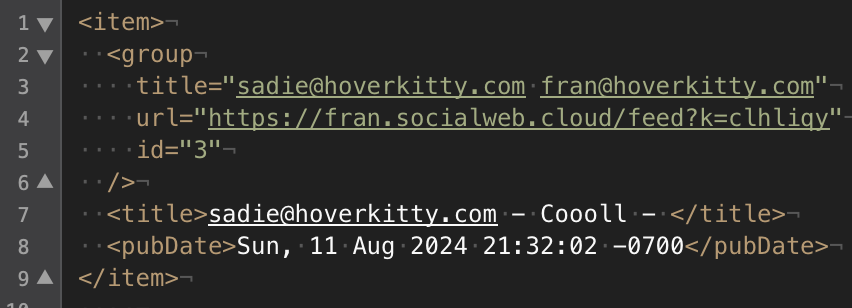
    Message item element in a RSS feed with group element added

    The < GROUP > element has attributes named “id”, “url” and “title”. The “id” attribute is a string that uniquely identifies the particular group chat on the “host” feed reader/publisher web app. The “title” attribute is a string that contains the name of the group. In the Social Web group chat app, the group name is currently set to display the email addresses of all group chat participants. The “url” element contains the URL of the feed.

    New message via MetaWebLog newPost

    With these changes a feed reader can now “see” the group in the feed. Lets use the information about the group to send a new message to the group from the “client” feed reader to the “host”.

    MetaWebLog protocol was built for this, it is a standard used by blogging tools like WordPress, a standard way to format an XML fragment with the new blog message title and content.
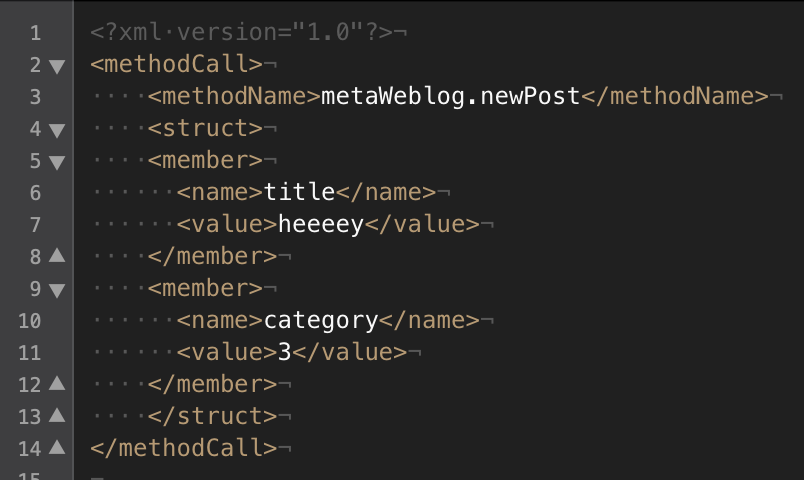
    Adding a new message to the feed host's group chat from a feed reader with MetaWebLog protocol

    The feed reader “client” will take the “id” of the group from the feed and put that into MetaWebLog’s “category” field. The feed URL from the “url” attribute of the < group > element will be used as the endpoint for the XML-RPC POST request. This URL includes a unique key to identify which “client” account on the host’s feed reader/publisher app created the new message.

    Real-time with < cloud >

    OK, now the “client” can “see” the group in the host’s feed and send new messages to the group, but how will he know when there is a new post on the “host”?

    The < CLOUD > element of RSS includes information for an additional feed-subscription step. This step involves using information from the cloud element attributes to make a request to the feed source to subscribe to callback “pings” when the feed changes. This is called a “light ping” because the callback does not include any message data in it.
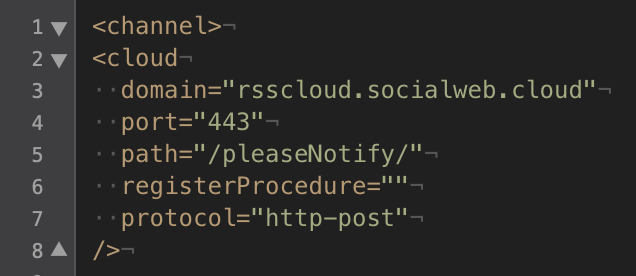
    Using the cloud element in a feed to receive real-time notifications of feed changes

    Real-time with WebSockets

    When the cloud callback executes, the “client” re-loads the host’s feed again to get the fresh messages. It will then use WebSockets to push the fresh messages instantly to the Web browser for rendering.
  • Training an AI model to detect misinformation

    A couple summers ago I worked on an AI app prototype that uses a trained model to assess whether an article resembles misinformation articles from the FakeNewsNet dataset or not

    Github – Disinfo Filter by Brian Hendrickson

  • Results – Social Web Acid Test Zero (#Swat0)

    Tuomas Koski (minime) and I (openmicroblogger) both submitted complete results for the contesthere is a collection of all of the results.

  • #Swat0 and a Salmon-like flow for RSS

    This summer I joined other federated social Web implementors at the Federated Social Web Summit, it was a great, collaborative atmosphere where everyone was given space to share their implementation details and ideas for the future.

    As an early implementor of StatusNet’s original Open Microblogging federation protocol, I was really interested to catch up on OStatus and find out about Diaspora and how it would work. The event did not disappoint, I sat next to Raffi from Diaspora and had a chance to talk protocols with Rob Dolin, Joseph Smarr, Tantek Çelik, Brett Slatkin, Evan Prodromou, Zach Copley, David Recordon and many more.

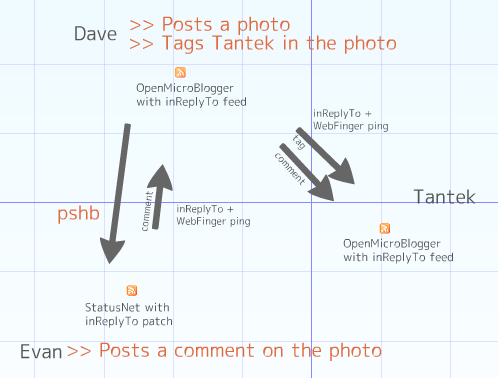
    When the summit wrapped up, Evan, Dave and Tantek introduced an “acid test” for social network interoperability, the acid test was dubbed “SWAT0” (Social Web Acid Test Zero). To pass the test, two or more codebases would allow a user to tag another user in a photo, comment on the photo, and notify users of activity, all of this between two or more social networks using open standards.

    Last summer I was briefly in the geek news when tr.im announced that they were closing their doors and FriendFeed was snapped up, I called in to the Bad Hair Day podcast and explained rp.ly, my open source tr.im replacement. Before the rssCloud meetup, Michael Sullivan (@sull) wrote a post “Conversations in the Cloud” and came up with the idea to use my rp.ly domain (sounds like “reply”) to create an RSS namespace: in.rp.ly/to.

    As I thought about simple ways to achieve the acid test, I remembered Michael’s post. By late August I had a working version of the SWAT0 flow (before StatusNet’s Sept. 10 SWAT0 release) using StatusNet and OpenMicroBlogger. I’ve contributed to StatusNet before — I created the “Templonica” plugin. So I already had a place to publish my StatusNet/inReplyTo commits: Gitorious.

    Joe Gregorio’s Comment API is closely related to TrackBack and PingBack, I combined that with the <channel> element’s <textInput> tag for the first version, then I talked to Michael and started working on a namespace (see below). The purpose of the inReplyTo namespace is to allow aggregators and readers to notify the feed origin about comments that are “in Reply To” the original.

    Here’s an example: Bob wants to reply to Alice (she’s using a different blogging service than he is). When he publishes a reply to his own feed, his application reads her feed’s inReplyTo elements and uses the information to ping her channel-level form handler. The details of this interaction are described in a new namespace — inReplyTo (1).

    Bob’s reply will have a <comments> item-level element in his feed, a link to Alice’s post that he replied to. When Alice’s application uses WebFinger to discover and read Bob’s feed, it can use the <comments> element to associate Bob’s reply with the appropriate thread, or her application could show all replies in a tab, even from people she’s not subscribed to.

    If you are interested in participating in defining or implementing the inReplyTo protocol, contact @sull or @brianjesse.

    ############################
    ####### inReplyTo #########
    ############################

    Extension: inReplyTo

    Extension Name: inReplyTo

    Purpose: Applications can automatically send comment notifications by pinging the channel’s inReplyTo form handler url.

    Declaration: The name space for inReplyTo is defined at http://in.rp.ly/to

    <rss version=”2.0″ xmlns:inReplyTo=”http://in.rp.ly/to”>

    Elements: All elements are sub-elements of the <channel> tag.

    <inReplyTo:url> The url of the form handler

    <inReplyTo:user> An identifier of the user being replied to

    Applications append the inReplyTo url with the guid and other attributes to identify the item being commented on. It can then ping the combined url when a new comment is created.

    Example:

    <inReplyTo:user>Alice@aliceweb.org</inReplyTo:user>
    <inReplyTo:url>http://aliceweb.org/.well-known/inReplyTo/</inReplyTo:url>

    When a comment is created, the application combines the channel’s inReplyTo url (http://aliceweb.org/.well-known/inReplyTo/) with the item guid and other inReplyTo elements, and POSTs a request to the combined url: (http://aliceweb.org/.well-known/inReplyTo/?item=http://aliceweb.org/posts/12&user=Alice@aliceweb.org)

    ############################
    ############################

    Social Web Acid Test Zero from Brian Hendrickson on Vimeo.

  • we need to create the data web

    Later today i’ll share my ideas about 2-way feeds, OpenMicroBlogger and StatusNet. In 2008 I implemented the Open Microblogging 0.1 specification, in 2009 I migrated the OpenMicroBlogger federation feature to rssCloud because there was good support in WordPress and Laconi.ca as well. Now in 2010 i’ve added (partial) OStatus capability and helped with development of an upstream-commenting extension for RSS feeds that can use Webfinger for discovery.

  • activitystrea.ms & portable contacts in real-time! @rsslike is a wordpress plug-in for mashing up Buzz, Facebook, Twitter and RSS

    Hi, thanks for stopping by to learn more about @rssLike.

    rssLike is a standards-based Like button that combines Facebook, Twitter and Google Buzz together into a single button. It also publishes Likes from your Web site as a real-time activitystrea.ms/RSS feed.

    rssLike is now available as a safe, easy-to-install WordPress plug-in (latest version is 0.2.3) download it from Github.

    To use rssLike, first set a password (SSL encrypted) at rssLike.com, then copy the settings into your WordPress admin dashboard.

    When you post, include the following string: [ rssLike ] (no spaces) and that will make the three-network Like button appear alongside your article.

    rssLike Screen Shots

    Like this post? Use rssLike (below) to like it! Thanks

    [rssLike]

  • Introducing OpenMicroBlogger

    OpenMicroBlogger is my new open source microblogging product, it is compatible with Identi.ca/Laconi.ca by Evan Prodromou.

    On June 16 I was searching for “OAuth XRDS” and found a brand-new specification at http://openmicroblogging.org written by Evan Prodromou.

    The spec had the features I was looking for: cross-site real-time subscriptions, cross-site profile updates, cross-site avatar/profile transfer. I was doing some of this stuff between my sites already with OpenID/SREG but Open Microblogging 0.1 had a terrific feature set.

    http://openmicroblogger.com and http://openmicroblogger.org are the new Web sites where you can find out about OpenMicroBlogger, which is a new implementation of the OpenMicroBlogging.org specification for site-to-site Microblogging.